연재 · 여행 계획, 여행, 그리고 그 후
- 1. 여행을 한 페이지에
- 2. 출발 전, 연락을 잇다
- 2-1. ntfy로 가족 연락망 만들기 (기술 부록)
- 3. 여행 중, 다음 한 시간
- 4. 돌아와서, 기록을 잇다
연재 2편에서 이야기한 ntfy 가족 연락망을 개발자 관점에서 정리한 구현 노트입니다. 무엇을 목표로 잡았고, 어떻게 보내고 막았으며, 여행 중 실제로 무엇을 확인했는지를 적습니다.
기록 범위
- 운영 기록은 여행 당시(2026년 10월) 확인한 결과입니다. 지금의 실행 상태나 모든 기기의 수신을 새로 검증한 것은 아닙니다.
- 재현 예시(Compose·Python·의사코드)는 이 글을 위해 다시 쓴 것이며, 운영 코드의 복사본이 아니고 새로 배포하거나 실행하지 않았습니다.
- 실제 서버 주소·토큰·토픽·가족 계정은 싣지 않았습니다. 공식 문서는 2026년 10월 13일(한국시간) 기준으로 확인했습니다.
English
A developer’s implementation note for the ntfy family channel described in Part 2: the goals, how messages were sent and guarded, and what was actually checked during the trip. “Operational record” means results checked during the trip in October 2026, not a fresh check of the current runtime or every device. “Reproduction examples” (Compose, Python, pseudocode) were rewritten for this article; they are not copies of production code and have not been newly deployed or run. Real server addresses, tokens, topics, and family accounts are omitted. Official documentation was checked on October 13, 2026 (KST).
01. 목표와 경계
로밍으로 전화·문자가 안정적일지 확신이 없었고, 열 살 아이는 데이터 전용 유심만 있었습니다. 그래서 목표는 세 가지였습니다. 데이터 연결이 있는 가족에게 짧은 메시지를 보낸다. 다음 일정 한 시간 전에 이동 방법과 비용을 안내한다. 현장 변경을 다음 알림에 반영한다.
역할은 다섯으로 나눴습니다. 일정 원본(캘린더와 여행 마크다운), 안내문 작성(Luan이 수신자에 맞춰 작성), 실행 시각 관리(예약 실행기), 전송(발행기), 결과 기록입니다. 문안을 미리 확정해 두고 실행하므로 발송 순간마다 새 문장을 생성할 필요가 없었습니다.
경계도 분명했습니다. 이 구성은 알림 발행·구독이 중심이어서 가족 간 채팅, 읽음 확인, 구조 요청의 접수 확인을 스스로 제공하지 않습니다. 데이터가 끊기면 ntfy도 실시간 연락을 보장하지 못하므로, 급한 연락에는 직접 확인 방법과 만날 장소 같은 가족 약속이 따로 필요합니다.
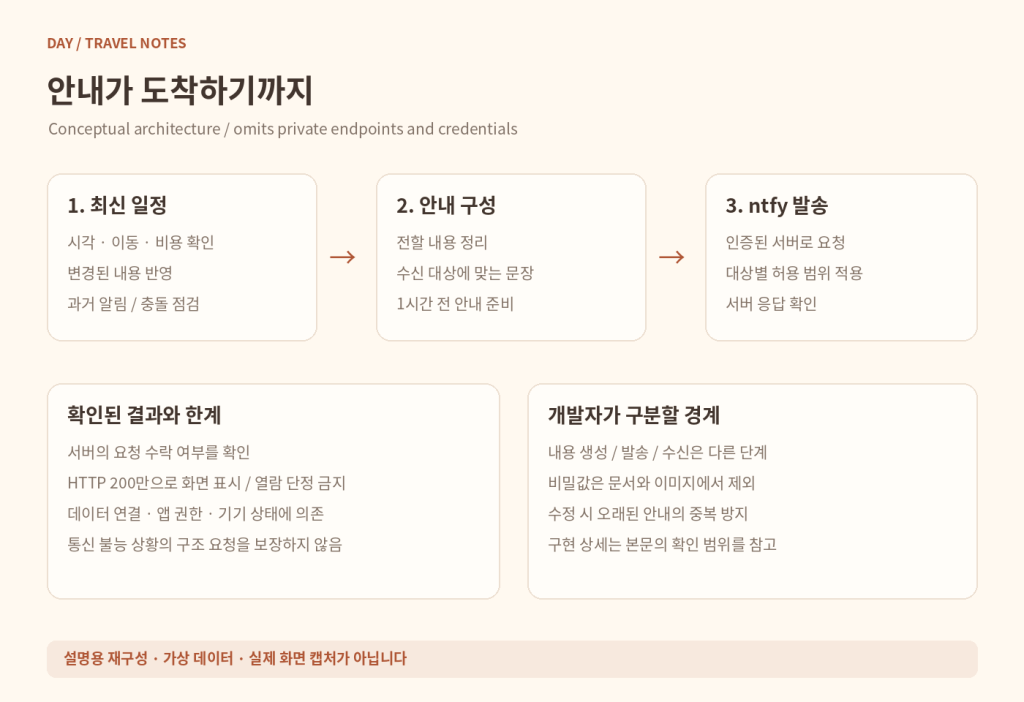
English
I was unsure whether calls and texts would be reliable even with roaming, and our ten-year-old had a data-only SIM. The goals were to send short messages to connected family members, provide transport and cost guidance an hour before the next activity, and reflect on-the-ground changes in later notifications.
Responsibilities were split into itinerary sources (Calendar and the travel Markdown), message preparation (Luan, per recipient), scheduling, publishing, and result recording. Because messages were finalized in advance, nothing had to be generated at send time. The design centers on publish/subscribe; it does not by itself provide family chat, read receipts, or acknowledgment of an emergency request. Without data, ntfy cannot guarantee real-time contact, so urgent communication also needs direct confirmation and family arrangements such as a meeting point.
02. Docker와 수신 권한
집 서버의 ntfy에 가족별 수신 경로를 두었습니다. 아래는 재현용 최소 골격입니다. 이미지 버전은 직접 검증한 버전으로 고정하고, 저장 디렉터리의 소유권과 쓰기 권한을 먼저 준비합니다. 호스트의 HTTPS 프록시 뒤에 둔다는 전제로 포트는 localhost에만 열었습니다.
# compose.yaml — reproduction scaffold
services:
  ntfy:
    image: binwiederhier/ntfy:${NTFY_VERSION:?set a tested version}
    command: ["serve"]
    restart: unless-stopped
    ports:
      - "127.0.0.1:8080:80"
    volumes:
      - ./config:/etc/ntfy:ro
      - ./state:/var/lib/ntfy
      - ./cache:/var/cache/ntfy

# config/server.yml — illustrative values only
base-url: "https://notify.example.com"
listen-http: ":80"
auth-file: "/var/lib/ntfy/user.db"
auth-default-access: "deny-all"
cache-file: "/var/cache/ntfy/cache.db"
# iOS 즉시 알림이 필요하면 (아래 설명 참고)
upstream-base-url: "https://ntfy.sh"
골격은 ntfy 공식 Docker 문서를 따랐습니다. HTTPS와 사용자·토픽별 읽기/쓰기 권한을 먼저 설정한 뒤 휴대전화 앱에 서버와 구독 토픽을 등록합니다. 토픽 이름을 어렵게 만드는 것만으로는 접근 통제를 대신할 수 없습니다(접근 제어 문서).
iOS는 따로 확인해야 합니다. 자가 호스팅 서버만으로는 잠긴 iPhone에 즉시 알림이 오지 않을 수 있고, 공식 문서는 이를 위해 upstream-base-url로 ntfy.sh를 거치는 경로를 설명합니다. 이 외부 의존과 정보 흐름을 검토한 뒤 실제 기기에서 시험하세요. 당시 구축 기록(10월 1일)에는 iOS용 upstream을 켜 둔 것이 확인됩니다.
English
We ran ntfy on the home server with recipient-specific routes. The scaffold above follows the official Docker documentation: pin an image version you have tested, prepare writable storage with suitable ownership, and bind only to localhost behind an HTTPS proxy. Configure HTTPS and per-user topic permissions before registering subscriptions on each phone; hard-to-guess topic names do not replace access control.
iOS needs an extra check: a self-hosted server alone may not deliver prompt notifications to a locked iPhone. The official docs describe an upstream-base-url path through ntfy.sh for this. Review that dependency and information flow, then test on a real device. The October 1 setup record confirms an iOS upstream was enabled.
03. HTTP로 발행하기
전송 계층은 작은 HTTP 요청 하나로 분리할 수 있습니다. 아래는 Python 표준 라이브러리로 쓴 재현 예시입니다. 미리 권한을 받은 토큰을 안전한 실행 환경에서 주입하고, 코드에 실물 토큰을 넣거나 요청 헤더를 로그로 남기지 않습니다.
# publish_example.py — illustrative
import json
import os
from urllib.request import Request, urlopen
from urllib.error import HTTPError, URLError

base = os.environ.get("NTFY_BASE_URL",
                      "https://notify.example.com").rstrip("/")
topic = os.environ["NTFY_TOPIC"]
token = os.environ["NTFY_TOKEN"]
if not base.startswith("https://"):
    raise ValueError("HTTPS required")
if any(c in topic for c in "/?#\r\n"):
    raise ValueError("Invalid topic")

body = json.dumps({
    "topic": topic,
    "title": "Next stop in one hour",
    "message": "Check the latest itinerary before leaving.",
    "priority": 3
}, ensure_ascii=False).encode("utf-8")

request = Request(base, data=body, method="POST", headers={
    "Authorization": "Bearer " + token,
    "Content-Type": "application/json"
})

try:
    with urlopen(request, timeout=10) as response:
        result = json.load(response)
        if response.status == 200 and result.get("id"):
            print("server_accepted", result["id"])
        else:
            print("needs_review")
except HTTPError as error:
    print("http_error", error.code)  # do not dump private body
except (URLError, TimeoutError, OSError):
    print("uncertain")  # inspect before retrying
JSON 발행과 Bearer 인증은 발행 문서와 인증 문서를 기준으로 했습니다. 실제 발행기라면 여기에 수신자 검증, 중복 방지, 결과의 영속 저장을 더해야 합니다. 출력값은 서버 응답을 분류한 것이지 읽음 확인이 아닙니다.
English
The publishing layer can be isolated as one small HTTP request. The example uses only the Python standard library. Inject a previously authorized token from a protected runtime environment; never embed real tokens or log request headers. JSON publishing and Bearer authentication follow the publishing and authentication docs. A production publisher also needs recipient validation, duplicate protection, and persistent result storage. The output classifies the server response; it is not a read receipt.
04. 한 시간 전 실행과 중복 방지
처음 예정된 안내는 목표보다 약 4분 늦게 수동으로 실행됐습니다. 그 뒤 집 서버의 사용자 systemd 타이머로 실행을 옮겼고, 다음 예약 실행에서 서비스 종료 코드 0과 HTTP 200 네 건을 확인했습니다. 예약을 만들었다는 사실보다 실제 시각에 프로세스가 돌았는지를 확인하는 것이 중요했습니다.
규칙은 네 가지였습니다. 일찍 보내지 않는다. 10분까지만 늦어도 보낸다. 안정적인 식별자로 중복을 막는다. 보냈는지 불확실하면 멈추고 확인한다. 시간은 Asia/Tokyo 기준이었고, 한국과 일본이 모두 UTC+9인 이번 여행에서는 시차가 없었습니다. 다른 나라라면 시간대와 일광절약시간을 따로 계산해야 합니다.
due_at = event.start_instant - 1_hour
delivery_key = (event.id, revision, recipient_alias, variant)

with single_runner_lock():
    if source.sync_error or source.age > 30_minutes:
        hold("stale_source")
    elif revision != latest_event_revision:
        skip("obsolete")
    elif now < due_at:
        skip("not_due")
    elif now > due_at + 10_minutes:
        hold("late")
    elif ledger[delivery_key] in {"accepted", "uncertain", "sending"}:
        skip("inspect_existing_record")
    else:
        ledger.persist(delivery_key, "sending")
        result = publish(prepared_message)
ledger.persist(delivery_key, classify(result))개정판(obsolete) 확인을 기록장부 확인보다 앞에 두면, 지난 판의 불확실한 기록 때문에 최신 판 판단이 막히지 않습니다. 요청을 보낸 뒤 응답을 받기 전에 연결이 끊기면 서버는 이미 메시지를 받았을 수 있습니다. 이때 무조건 재시도하면 중복 알림이 되므로 ‘보냈는지 모름(uncertain)’을 별도 상태로 남겨 확인합니다. 잠금과 영속 기록을 두더라도 외부 서버와의 exactly-once 전송까지 보장되지는 않습니다.
English
The first scheduled briefing was run manually about four minutes late. Execution then moved to a user-level systemd timer on the home server, and the next scheduled run produced exit code 0 and four HTTP 200 responses. Verifying an actual run mattered more than creating a schedule. The rules: never send early, allow up to ten minutes late, use stable identifiers for duplicate protection, and stop to inspect when a send is uncertain. Times used Asia/Tokyo; Korea and Japan were both UTC+9 on this trip, but other destinations need explicit timezone and DST handling.
The pseudocode is a reproduction design, not the original implementation. Checking obsolete before the ledger keeps an uncertain record from an older revision from blocking the latest one. If the connection drops after sending but before the response, the server may already have accepted the message, so blind retries risk duplicates; keep an explicit uncertain state. A lock and persistent ledger still do not guarantee exactly-once delivery across an external server.
05. 바뀐 일정 따라잡기
발송 전에는 캘린더와 여행 마크다운을 다시 확인했습니다. 동기화 오류가 있거나 Day의 일정 캐시가 30분보다 오래되면 그대로 보내지 않았습니다. 시간뿐 아니라 목적지, 이동 수단, 비용의 확정·추정 여부도 안내문과 맞아야 했고, 정해지지 않은 비용은 ‘미정’으로 남겼습니다.
대표적인 사례가 10월 4일 버스 출발을 14시로 맞춘 일입니다(연재 3편). 캘린더·마크다운·안내문을 함께 고치고 예전 14시 30분 알림을 지웠으며, 이미 지난 13시 사전 안내는 늦게 보내지 않았습니다. 이때 안내 시작 시각 29개가 캘린더와 일치하는지도 확인했습니다. 이 숫자는 정합성 검사 대상 수이며 발송 성공 횟수가 아닙니다.
English
Before sending, Calendar and the travel Markdown were checked again. A sync error or a Day itinerary cache older than thirty minutes blocked an unchecked send. Destination, transport, and whether a cost was confirmed or estimated also had to match the message; an unknown cost stayed unknown. The clearest case was the October 4 change to a 14:00 bus departure (Part 3): Calendar, Markdown, and briefings were reconciled, the old 14:30 notification was removed, and the already-past 13:00 briefing was not sent late. At that checkpoint, twenty-nine briefing start times were checked against Calendar — a count of consistency checks, not of successful sends.
06. 검증 결과와 한계
- 10월 4일 10:00 — 11시 돌고래 공연 한 시간 전 안내 4건이 HTTP 200으로 수락됐습니다. 어른용은 부모에게, 아이용은 보호자 한 명과 아이에게 갔고, 전송 기록과 문안의 대응도 확인했습니다.
- 10월 3일 — 별도 요청으로 다음 날 안내 2건과 Luan이 아이에게 쓴 편지 1건이 성공으로 기록됐습니다. 정기 안내와 별도 요청을 다른 전송으로 관리한 사례입니다.
- 구축 상태 — ntfy 2.28.0, 비공개 컨테이너 네트워크, 기본 접근 거부, 익명 읽기·쓰기 403, 회원가입 비활성화. Day 메시지 화면은 수신 역할 4개를 두고, 서버에서 본문 100자 제한과 인증 계정 기반 발신자 표시를 적용했으며, 발행 대상을 지정된 수신 토픽 4개로 제한했습니다. (100자 제한은 Day의 짧은 메시지 입력에만 해당합니다.)
기억에 남는 문제는 Cache: no였습니다. Day의 발행 요청에 이 옵션이 붙어 있어, 알림은 뜨는데 나중에 메시지를 다시 조회하지 못했습니다. 옵션을 빼고 배포한 뒤 사용자 발신 메시지가 24시간 캐시에 남는 것을 확인했고, 서버 테스트 40개와 발신자 표시 회귀 테스트도 통과했습니다. 다만 iOS 앱 목록에 계속 남는지까지 끝까지 확인하지는 못했습니다. 즉시 알림과 나중에 다시 읽기는 서로 다른 검사 항목이고, 보관 정책도 기능의 일부였습니다.
다시 만든다면 정상 발행, 잘못된 인증, 잘못된 수신자, 중복 실행, 서버 재시작, 통신 단절, 일정 변경, 잠금 화면 수신을 각각 테스트 항목으로 두겠습니다. 또 ntfy가 요청을 수락했다고 Luan이 자동으로 답하는 것은 아니므로, 대화 처리나 다른 서비스로의 중계는 별도 연결과 검증이 필요합니다.
English
October 4, 10:00 — four advance briefings for the 11:00 dolphin show were accepted with HTTP 200: the adult version to the parents, the child version to a parent and the child; delivery records were checked against the intended variants. October 3 — a separate request produced three successful send records: two copies of the next-day guidance and one letter from Luan to the child. Setup — ntfy 2.28.0, a private container network, default-deny access, HTTP 403 for anonymous reads and writes, and disabled signup; the Day message screen offered four recipient roles, enforced a 100-character body limit and an authenticated sender label, and published only to four designated topics (the limit applied only to Day’s short-message input).
One notable issue was Cache: no on Day’s publish requests: notifications appeared, but messages could not be retrieved later. After removing it, user-origin messages were verified in the 24-hour cache, and forty server tests plus sender-label regression checks passed; persistence in the iOS app list was not verified end to end. Prompt delivery and later retrieval are separate test cases. A reproduction should test valid publishing, bad credentials, wrong recipients, duplicate runs, restarts, network loss, schedule changes, and locked-screen reception. ntfy accepting a request does not mean Luan replies; conversation handling needs its own integration.
07. 공개 저장소로 정리한다면
공개 저장소로 정리한다면 코드보다 재현 경계를 먼저 적겠습니다. 아래는 제안하는 구조일 뿐 이미 만들어진 저장소는 아닙니다. 실제 일정·수신자·토큰은 넣지 않고, 가짜 데이터로 중복 방지와 변경 처리를 확인하는 테스트를 함께 둡니다.
family-notifier/
  README.md
  compose.yaml
  config/server.example.yml
  .env.example
  src/publisher.py
  src/scheduler.py
  src/ledger.py
  tests/test_duplicate_guard.py
  tests/test_schedule_revision.py
  tests/test_uncertain_send.py
  fixtures/synthetic_itinerary.json
  .gitignore
README에는 요구사항, 검증한 버전, 사전 권한 설정, 기기별 구독 절차, 실패 시 확인 순서를 남깁니다. .env·토큰 파일·인증 DB·전송 이력·실제 일정은 저장소에서 빼고, 로그 본문과 스크린샷에 개인정보가 남지 않았는지도 따로 확인합니다. 성공 기준은 ‘서버 수락’, ‘기기 표시’, ‘사람의 확인’으로 나눠 기록하겠습니다.
작은 메시지 하나에도 원본 일정, 실행 시각, 수신자, 변경 이력, 결과 확인이 필요했습니다. 집 서버는 그 연결을 맡았고, ntfy는 짧은 안내를 전달했습니다. 다음에 다시 만든다면 읽음 확인과 장애 상황의 대체 연락 절차를 별도 기능으로 설계하겠습니다.
English
For a public repository, I would document the boundaries of reproduction before the code. The structure above is a proposal, not an existing repository; it excludes real itineraries, recipients, and tokens and uses synthetic data to test duplicate protection and change handling. The README should cover requirements, tested versions, prerequisite permissions, device subscription steps, and troubleshooting order. Environment secrets, token files, auth databases, delivery histories, and real itineraries stay out, and log bodies and screenshots need a separate privacy check. Success criteria should separate server acceptance, device display, and human acknowledgment.
Even a short message depended on the source itinerary, execution time, recipient, revision history, and result verification. The home server coordinated these parts, and ntfy carried the brief guidance. A future version would design acknowledgment and fallback contact procedures as separate features.
이어서 읽기
이 부록의 배경 이야기 → 2. 출발 전, 연락을 잇다
여행 중 실제로 쓴 이야기 → 3. 여행 중, 다음 한 시간
댓글은 현재 WordPress 원문에서 이용할 수 있습니다. 정적 사이트의 댓글 기능은 이전 방식 결정 후 연결합니다.