집 안에 작은 서버를 두고, 일상에 필요한 것들을 하나씩 만들고 있습니다. 가족의 일정과 할 일, 여행 기록을 모아 보는 앱도 그중 하나입니다. 이 블로그에는 그 서버에서 무엇을 만들고, 실제로 써 보면서 무엇을 고치게 되는지 적습니다.
English
I have a small server at home, where I am building things for everyday life, one at a time. One of them is an app that brings together our family’s schedules, tasks, and travel records. This blog is about what I make on that server and what I end up changing as we actually use it.
흩어진 일상을 한곳에
가족의 일정은 캘린더에, 해야 할 일은 할 일 목록에, 여행 기록은 또 다른 곳에 있습니다. 각각의 도구는 제 역할을 하지만, 하루를 살펴보려면 여러 곳을 오가야 합니다. 여행을 준비할 때도 날짜를 확인하고, 준비물을 챙기고, 다녀온 뒤 기록을 남기는 일이 이어집니다.
그렇게 만들고 있는 앱이 Day입니다. 가족 일정과 여행, 할 일을 한곳에서 다루고, 이미 쓰고 있는 구글 캘린더와 할 일 도구도 연결했습니다. 화면에 무엇을 더 넣을지보다, 필요한 내용을 어떻게 쉽게 찾게 할지를 더 오래 고민하고 있습니다.
English
Our family’s schedules are in a calendar, tasks are on a list, and travel records are somewhere else. Each tool does its job, but getting an overview of the day means moving between them. The app I am building from that idea is called Day. It brings family schedules, travel, and tasks into one place and connects to the Google Calendar and task tools we already use. I spend more time on how to make information easy to find than on what to add to the screen.
Day의 일정관리 화면
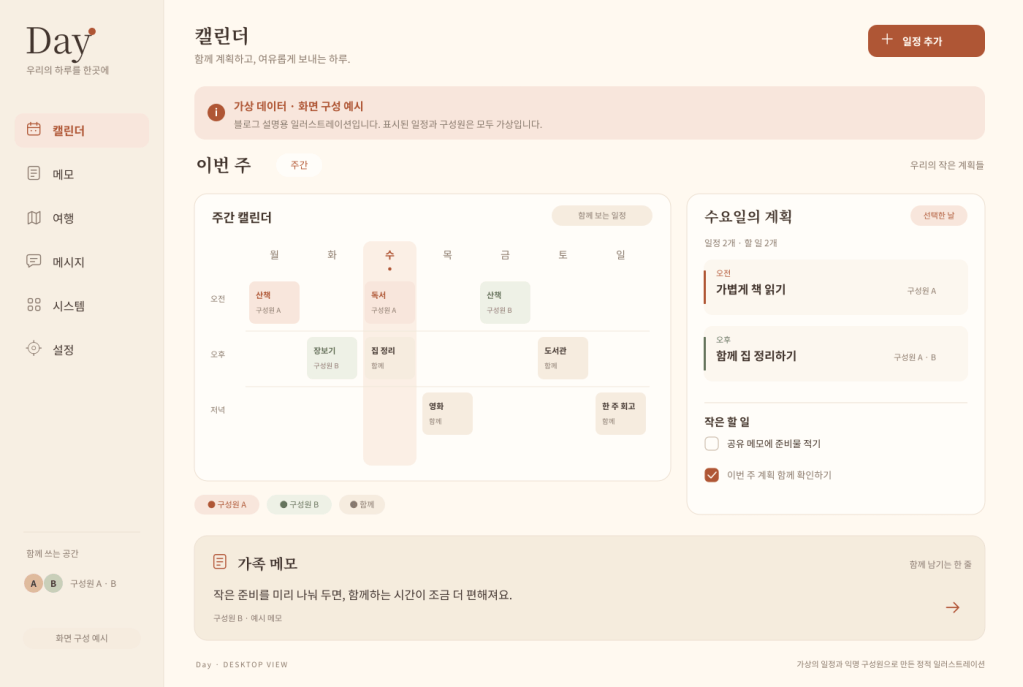
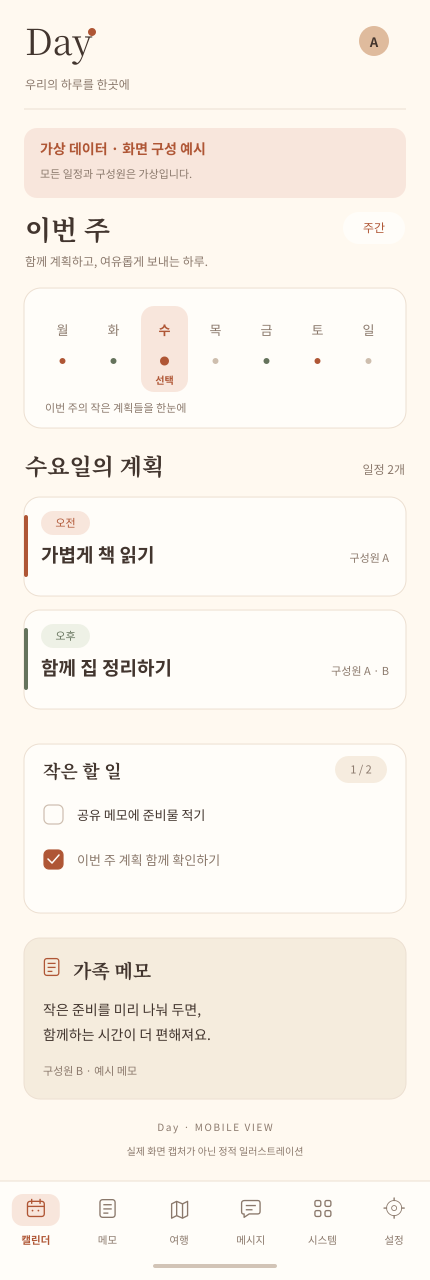
데스크톱에서는 왼쪽 메뉴 옆에 달력과 선택한 날의 일정·할 일을 두 열로 놓고, 가족 메모를 함께 보여 줍니다. 모바일에서는 주간 달력 아래로 일정과 할 일을 카드로 쌓고, 하단 여섯 탭(캘린더·메모·여행·메시지·시스템·설정)으로 이동합니다. 두 이미지 모두 가상 일정과 익명 구성원만 넣은 예시입니다.
English
On desktop, the calendar and the selected day’s schedule and tasks sit in two columns beside the left navigation, with family notes in view. On mobile, schedule and task cards stack below a weekly calendar, and six tabs at the bottom lead to Calendar, Notes, Travel, Messages, System, and Settings. Both illustrations use only fictional schedules and anonymous members.
집 서버와 AI 비서 Luan
집 서버는 직접 만든 앱을 돌리고 자료를 보관하는 바탕입니다. 서버라는 말이 거창하게 들릴 수 있지만, 여기서 다루는 것은 일상에서 쓸 작은 도구들입니다. 무엇을 설치했는지보다 그것이 어디에 쓰이는지부터 이야기하려고 합니다. 직접 만든 도구는 쓰면서 계속 손보게 되고, 앱을 만드는 일과 서버를 관리하는 일도 함께 이어집니다.
이 과정에는 AI 비서 Luan도 함께합니다. 할 일을 정리하고, 개발 중인 내용을 살피고, 다음 작업을 이어 가는 데 도움을 받습니다. 어떤 도움을 받았고 무엇을 제가 직접 확인하거나 고쳤는지도 구체적인 작업을 통해 적겠습니다.
English
The home server runs the apps I make and stores what we need. “Server” may sound grand, but the subject here is small tools for everyday use, and I want to start with what they are for rather than what is installed. Tools I make myself keep needing adjustments, so building the app and looking after the server go together.
Luan, an AI assistant, is part of this, too. I get help organizing tasks, reviewing work in progress, and moving on to the next step. Through specific examples, I will write about the help I received and what I checked or revised myself.
만들고, 써 보고, 고치다
기능 하나를 붙였다면 왜 필요했는지, 어떻게 만들었는지, 써 보니 어땠는지를 함께 적습니다. 설치나 설정을 다룰 때도 그 앞에 있던 필요를 먼저 설명하면, 나중에 다시 읽을 때 맥락을 찾기 쉽습니다.
잘된 결과와 함께 막힌 부분과 실수도 남깁니다. 어디까지 확인했고 무엇이 남아 있는지, 고친 뒤 무엇이 달라졌는지를 구분해서, 만드는 과정이 보이는 기록을 쌓아 가겠습니다.
English
When I add a feature, I will write about why it was needed, how I built it, and what it was like to use. Explaining the need before the installation or configuration should make the context easier to find later. I will also record obstacles and mistakes — what I checked, what remains, and what changed after a fix — so the making process stays visible.
다음 이야기
첫 연재는 「여행 계획, 여행, 그리고 그 후」입니다. 가족의 일본 여행을 준비하고, 다녀오고, 기록으로 정리하기까지 집 서버와 Day, Luan이 어디에 쓰였는지 네 편에 나눠 적습니다.
댓글은 현재 WordPress 원문에서 이용할 수 있습니다. 정적 사이트의 댓글 기능은 이전 방식 결정 후 연결합니다. 원문에서 댓글 보기